

AsciiMath support
AsciiMath is a compact way to write equations as text. Metanorma uses Plurimath to convert AsciiMath to MathML for processing.
For rendering in HTML, the MathML generated is processed by MathJax for browser compatibility.
For rendering in Word, the MathML is converted to Office Math Markup Language (OMML), the math format of Office Open XML (OOXML).
The examples below use Plurimath 0.11.12. For a list of recognized functions and fonts, see the Plurimath AsciiMath support list.
Writing an equation in Metanorma
Set the document attribute :stem: asciimath, then put an equation in a [stem] block:
:stem: asciimath
[stem]
++++
sqrt(x^2+y^2)
++++
This expression is the square root of the sum of the squares of x and y. For the same expression within a paragraph, write:
stem:[sqrt(x^2+y^2)]See Mathematical expressions for more about block and inline math.
Grouping and visible parentheses
Parentheses can group an operand without appearing in the converted equation. For example, the numerator of (a+b)/c is a+b; the grouping parentheses are omitted from the MathML. Use a second pair when the numerator must retain visible parentheses:
(a+b)/c
((a+b))/c
The second form retains parentheses around the numerator. This double-parentheses convention is shared with MathJax's AsciiMath parser. Plurimath 0.11.12 represents the doubled numerator as a one-cell table in MathML, so inspect the equation's layout when using this form in Word.
Some contexts already retain visible parentheses: (a)_n keeps the parentheses around a without an extra pair.
Scripts, fractions, and functions
Use _ for a subscript and ^ for a superscript. Group an operand in parentheses to make its extent clear:
a_1
x^(-2)
sum_(i=1)^n i^3
Here, (-2) groups the negative exponent and (i=1) groups the lower bound of the sum.
Use / for a fraction. Parentheses group a compound numerator, denominator, or function argument:
(a+b)/c
sqrt(x^2+y^2)
Plurimath also recognizes functions such as root, frac, sin, and text; the support list above gives the available names.
Matrices and commas
Commas separate matrix entries, and each bracketed inner list supplies a row:
[[a,b],[c,d]]This matrix has two rows and two columns.
Text and units
Use quoted text or text(...) to include words in an equation:
"when x > 0"
text(when x > 0)
Both forms produce MathML text (mtext). When converted back to AsciiMath, both use the quoted form.
Use a quoted unitsml(...) expression to include units:
h = 6.62607015 xx 10^(-34) "unitsml(kg*m^2*s^(-1))"The quotes are part of this input form. Plurimath recognizes the embedded AsciiUnits expression and parses the units. See the UnitsML guide for unit syntax and conversions.
Decimal commas
By default, Plurimath uses a full stop as the decimal marker. In this mode, 1,2 is two numbers separated by a comma operator.
Plurimath also accepts a locale when parsing an expression. For example, the Ruby API can select French decimal notation:
Plurimath::Math.parse("1,2", :asciimath, locale: :fr)With a comma decimal marker, 1,2 is one decimal number. Add spaces around a comma that separates expressions or numeric matrix entries:
1 , 2Choose the input form to match the locale configured by the application calling Plurimath.
Plurimath AsciiMath
AsciiMath implementations differ in their supported names and input forms. The following symbols and formatting commands are supported by Plurimath 0.11.12.
Miscellaneous symbols
...- ellipsis, …
\- non-breaking space (a backslash followed by a space)
quad- two non-breaking spaces
lim- lim operator
:'- ∵
/_\- △
frown- ⌢
A single apostrophe represents the prime operator (′):
'Grouping brackets
|:- | as left bracket
:|- | as right bracket
For example, |:x:| puts a vertical bar on either side of x.
Accents and color
tilde(x)- a tilde accent above
x cancel(x)- an upward diagonal strike through
x color(red)(x)xwith its MathML color set to red
Font commands
ii(x) sets x in italic. The font support list includes the other font commands.
Word output and invisible brackets
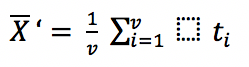
Invisible brackets ({:, :}) group an operator's argument without adding visible parentheses. The following example was previously documented with an unwanted placeholder square in Word output:
[stem]
++++
bar X' = (1)/(v) sum_(i = 1)^v t_i
++++
The documented workaround groups t_i as the argument of sum:
[stem]
++++
bar X' = (1)/(v) sum_(i = 1)^v {:t_i:}
++++
The corresponding earlier Word output was:
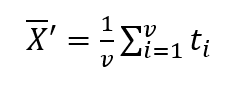
In Plurimath 0.11.12, the grouped form adds an OMML delimiter around t_i; the ungrouped form omits that delimiter. Check the generated Word document to confirm the layout when using this workaround.
Converting AsciiMath with the Ruby API
An application can parse the same expressions directly with Plurimath:
formula = Plurimath::Math.parse("sqrt(x^2+y^2)", :asciimath)
formula.to_mathml
Converting a formula back to AsciiMath may change its spelling or grouping. For example, the expression above serializes as:
sqrt(x^(2) + y^(2))Quoted compatibility forms need particular care when reused as input. For example, consider this quoted input:
"__{backepsilon}"Plurimath 0.11.12 parses it as a text element (mtext) containing the compatibility wrapper, rather than a backepsilon symbol.