

Attachments
Purpose
A Metanorma document can hyperlink to separate files that are distributed together with the document, even when they are not themselves Metanorma documents. These are called attachments.
Attachments could include source code, configuration files, executable binaries, or any other file -- so long as it is expected to be hyperlinked by Metanorma instead of being processed as a Metanorma file.
Syntax
File attachments are encoded in the bibliography section of a Metanorma document.
The syntax is provided as follows metanorma-standoc ≥ v2.8.10:
* [[[anchor,attachment:(file-path)]]], {attachment-desc}Where:
file-path- the file location of the attachment relative to the current document root file.
attachment-desc- the description of the attachment.NoteAttachment description is needed for accessibility and required for conformance with PDF/A and PDF/UA.
This indicates that schemas/schema.txt is an attachment to the current document, and assigns the anchor file1 to it.
* [[[file1,attachment:(schemas/schema.txt)]]], Schema textAny cross-references to file1 are to be interpreted as hyperlinks to that file, and will be so rendered in output.
By default, attachments are base64-encoded within the output Metanorma XML file, just as with images.
If the references to attachments are to be kept as file references in the XML file, set the document attribute data-uri-attachment: false.
PDF attachments
PDF attachments can be embedded in the PDF output of a Metanorma document.
Not all PDF readers support PDF attachments, though. This is the current list of attachment support in common PDF readers.
| Support | Platform | Application |
| ✅ | Windows | Adobe Reader |
| ✅ | macOS | Adobe Reader |
| ❌ | macOS | Preview |
| ❌ | macOS | Skim |
| ✅ | Cross-platform | Firefox (built-in PDF viewer) |
| ❌ | Cross-platform | Chrome (built-in PDF viewer) |
Metanorma supports the embedding of any kind of file to a PDF, including source code (e.g., .c, .java, .py files), data files (XML, JSON, YAML), other PDF documents, executable binaries, images and multimedia files, and spreadsheets and databases.
In HTML output, Metanorma handles attachments as individual files that are linked from content. These attachments are placed in a separate directory alongside the HTML file.
Given a Metanorma PDF files that contain attachments, users can easily download these attachments by clicking on the provided links.
Adding PDF attachments
Adding PDF attachments in Metanorma is a straightforward process that can be summarized in two steps:
- Encode the file attachment(s) in the bibliography section
- Reference the attachment(s) in the document using the usual cross-reference syntax
To encode an attachment in the bibliography section, use the following syntax:
* [[[attachment-anchor,attachment:({file-path-relative-to-root-document})]]]This syntax creates an invisible bibliography entry for the attachment and assigns it an anchor that can be referenced later in the document.
Now, you can reference the attachment anywhere in the document using the standard cross-reference syntax:
<<attachment-anchor>>This will create a hyperlink to the attachment in the generated PDF.
Example: Attaching a C source file to a PDF
Here's an example of how to attach a C source file to your Metanorma document:
== Scope
The C reference implementation source: <<file1>>. <2>
[bibliography]
== Bibliography
* [[[file1,attachment:(sources/program.c)]]] <1>
In the rendered document:
- The bibliography will be empty because attachments are never shown.
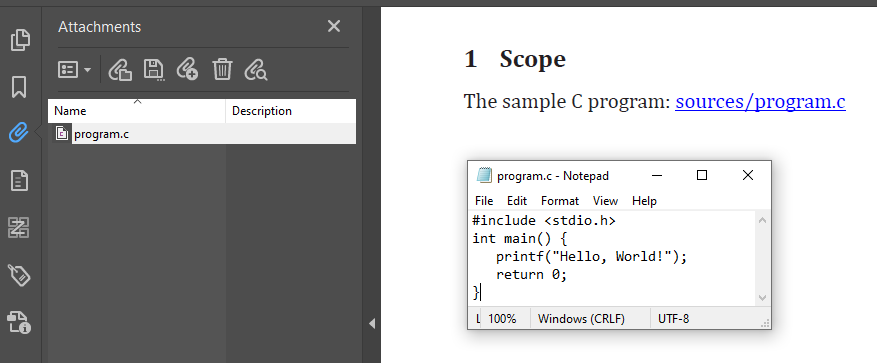
- Clicking on the link file1 will open the attached C source file.
When the PDF is generated, the attachment will be accessible through a hyperlink in the document.
Here's how it looks:
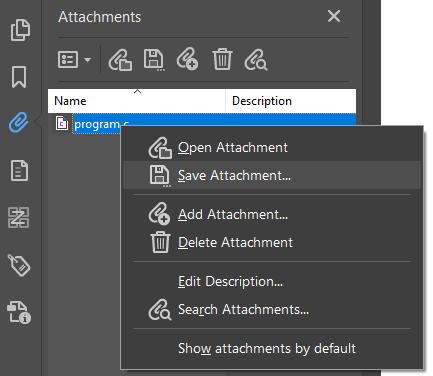
Users can then save the attachment from the PDF file using a compatible PDF reader:
PDF attachment attributes
PDF supports the following attributes for attachments:
- Volatile: indicates that the attachment is volatile and should not be cached.
- AFRelationship: indicates the relationship of the attachment to the document.
These attributes are realized in Metanorma through the bibliographic span syntax:
... span:classification.pdf-{Key}[{Value}] ...For Volatile, the syntax is span:classification.pdf-volatile[true].
For AFRelationship, the syntax is span:classification.pdf-AFRelationship[EncryptedPayload].
* [[[file1,attachment:(attachments/pdf-sample.pdf)]]],
  span:surname[Wyatt], span:givenname[Peter],
  span:date.issued[2021].
  span:date[2021].
  span:title[_Demystifying PDF through a machine-readable definition_].
  In span:series[LangSec Workshop at IEEE Security & Privacy, May 27th and 28th, 2021].
  span:publisher[IEEE].
  span:uri.citation[https://langsec.org/spw21/papers.html#pdfReadable].
  span:type[inproceedings]
  span:classification.pdf-volatile[true]
  span:classification.pdf-AFRelationship[EncryptedPayload]
Output
General
When the Presentation XML output for a Metanorma document is generated (as a precursor to DOC, HTML and PDF output), the documents are output to the folder {document-filename}_attachments relative to the output HTML file.
HTML
In HTML, references to the attachments are hyperlinked from the bibliography to their disk location.
In PDF, attachments are embedded in the PDF can be saved from the PDF file when using a compatible PDF reader.